A game-winning goal, a buzzer-beater 3-pointer, or a record-breaking sprint happens in a split second. But when you rewatch the video later, fast-moving action often turns into a blurry, pixelated mess.
This is a constant headache for parents filming school sports, coaches analyzing match footage, and fans recording from stadium stands. Fast motion blur, shaky handheld recording, poor indoor lighting, and heavy social media compression can easily ruin your best sports highlights.
Manually fixing action footage frame-by-frame used to require high-end video editing software and hours of complex rendering.
Today, AI video enhancement offers a much faster and smarter solution. Using tools like PicMa Studio Video Enhancer, you can automatically sharpen blurry sports clips, improve resolution, and restore fine details in just a few clicks.
Why Sports Videos Look Blurry (And How AI Fixes It)
Fast-moving athletics create unique visual challenges for standard smartphone cameras and consumer equipment:
- High-Speed Motion Blur: When players sprint across the field or swing a bat, slow shutter speeds create streak lines and soft edges.
- Low-Light Indoor Arenas: Indoor basketball courts, ice rinks, and gymnasiums often have inadequate lighting, forcing cameras to boost ISO and introduce heavy digital noise (grain).
- Distance and Heavy Digital Zoom: Filming from high stadium seats requires zooming in, which drastically reduces pixel density and makes jersey numbers and faces impossible to distinguish.
- Social Media Compression Artifacts: Messaging apps and social platforms heavily compress uploaded clips, destroying fine line details like the motion of a ball or field markings.
An advanced AI sports video enhancer handles these challenges by analyzing neighboring frames. It intelligently reconstructs edge sharpness, removes background noise, and fills in missing pixel details without creating unnatural distortion.

How to Enhance Blurry Sports Videos with PicMa Studio
You don't need complicated editing software to get started. Follow these four steps to enhance your sports footage.
Step 1. Choose the Sports Video You Want to Enhance
Start by selecting the video you want to improve.
It could be a football highlight, a basketball match, a tennis rally, or a running competition. You can also use recordings of school sports events, training sessions, or personal fitness activities.
For better results, use the original video file whenever possible. Videos downloaded from social media platforms may have already been compressed, which can reduce the visual information available for enhancement.
Step 2. Open PicMa Studio Video Enhancer
Visit PicMa Studio Video Enhancer to access the online tool.
Upload your selected sports video from your device to begin.

Step 3. Start the AI Enhancement Process
Once your video is uploaded, select the appropriate enhancement option available in the interface and start processing.
PicMa Studio uses AI to help improve video clarity and overall visual quality, making your footage look more refined.
This can be particularly useful for recordings with slightly soft details, lower resolution, or reduced image clarity.
Step 4. Preview and Save Your Enhanced Video
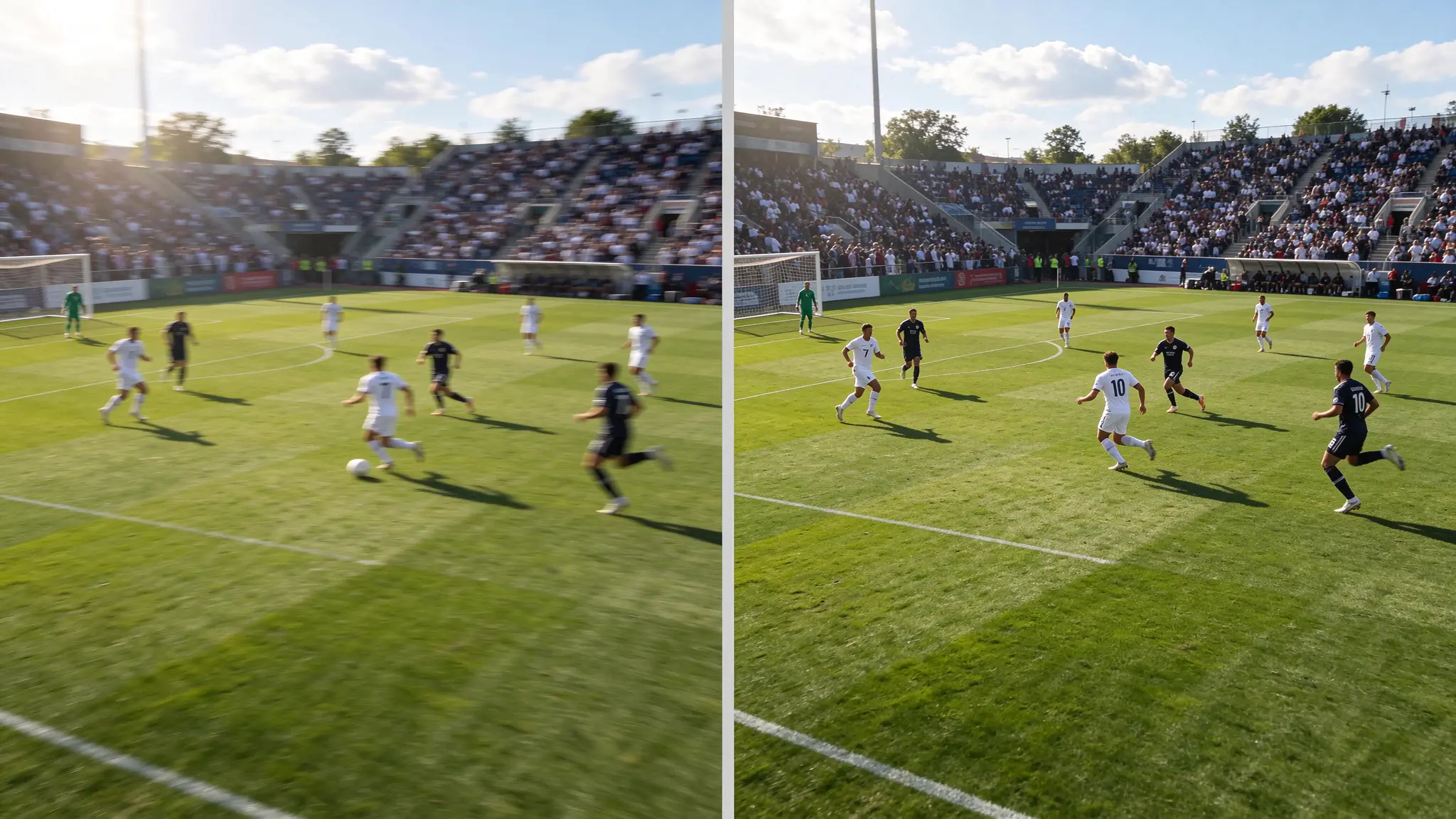
After processing, preview your enhanced video and compare it with the original.
Pay attention to moving players, ball movement, uniform details, and the overall sharpness of the footage. Watch several moments in the video to check whether the result looks natural during movement.
If you're happy with the improvement, save your enhanced video and enjoy your sports highlights with improved visual clarity.

Restoring Different Types of Sports Footage
Different athletic environments present distinct camera issues. Here is how AI enhancement helps across various sports scenarios:
1. High-Speed Field Sports (Soccer, Football, Rugby)
- The Challenge: Rapid camera panning across wide fields causes motion blur, making distant players look faint.
- The AI Fix: AI sharpens field lines, enhances jersey contrast, and keeps player outlines distinct during fast transitions.
2. Fast-Paced Court Sports (Basketball, Volleyball, Tennis)
- The Challenge: Indoor lighting produces grain, while rapid ball movements (like tennis serves or jump shots) turn into ghostly streaks.
- The AI Fix: AI reduces low-light noise while tracking and sharpening fast-moving objects across individual frames.
3. School Sports & Youth Athletic Events
- The Challenge: Parents often shoot from distant bleachers using smartphone digital zoom, leading to soft, pixelated footage.
- The AI Fix: AI upscaling enhances low-resolution clips, bringing clear visibility to your child's special moments.
4. Fitness & Training Analysis Clips
- The Challenge: Coaches and athletes need clear footage to review stance, biomechanics, and execution during training sessions.
- The AI Fix: Enhanced edge sharpness makes key joints, foot placement, and muscle movements far easier to analyze.

Preserve Every Unforgettable Sports Moment
Great athletic moments pass quickly, but your recorded memories don't have to stay blurry.
Whether you're building a highlight reel for college recruitment, analyzing team performance, or saving a prized family memory, PicMa Studio Video Enhancer makes it easy to bring sharp, crisp clarity to your favorite sports videos.

Related Readings:

 0

 English