What if a single photo could become a street dance performance? With AI video effects, you can transform a still portrait into a dynamic dance video without filming yourself or learning choreography.
Meet Street Dance, a new AI Live style on PicMa Studio. Simply upload a photo, let AI bring your subject to life, and create a short street dance video ready to share on social media.
Whether you want to surprise your friends, create a fun profile video, or try a new AI trend, Street Dance makes it easy to turn an ordinary picture into something more entertaining.
What Is the AI Street Dance Effect?
The AI Street Dance effect transforms an uploaded image into a short dance video. Instead of recording a dance yourself, you can start with a single photo and let AI generate the movement.
It's a fun way to:
- Turn a regular portrait into a dynamic dance clip
- Give your selfies a fresh and entertaining twist
- Create eye-catching videos for TikTok, Instagram Reels, and other social platforms
- Experiment with AI-powered video effects using your own photos
No dance recording or complicated video editing is needed. Just upload your image and generate.
How to Create an AI Street Dance Video with PicMa Studio
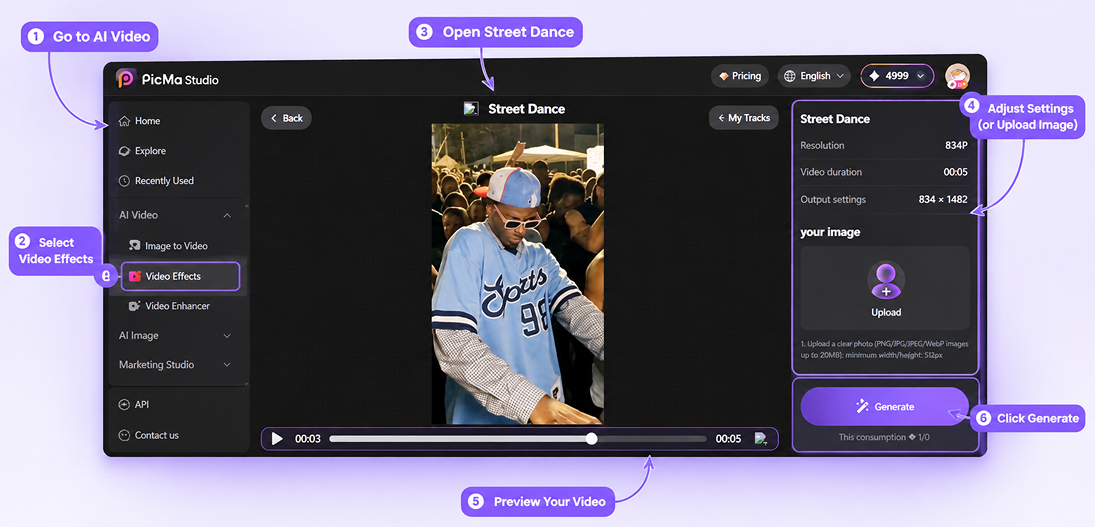
Ready to see yourself in a street dance video? Follow these simple steps.
Step 1. Open PicMa Studio AI Video
Visit the PicMa Studio AI Video page to explore available AI video styles.
Step 2. Select the Street Dance Style
Find and open the Street Dance effect, or go directly to the Street Dance AI Video tool.
Step 3. Upload Your Photo
Click Upload and choose the image you want to animate. For better results, use a clear photo with the subject fully visible.
Supported formats include BMP, JPG, JPEG, PNG, and WebP. Images can be up to 20MB.
Step 4. Generate Your Dance Video
Click Generate and let PicMa Studio create your AI street dance video. The current effect supports 1080P output, with a video duration of 5 seconds and a resolution of 1920 × 1080.
Tips for Better AI Street Dance Videos
Want to get a better result? Keep these simple tips in mind:
- Choose a clear photo: Use a sharp, high-quality image so the subject is easy to recognize.
- Keep the subject visible: Full-body or clearly framed photos can give the AI more visual information to work with.
- Avoid cluttered backgrounds: A simple background helps keep attention on the main subject.
- Use a photo with good lighting: Well-lit images make the subject easier to see.
Try the Street Dance AI Effect on PicMa Studio
Ready to turn your photo into a dance performance?
Explore more creative effects on the PicMa Studio AI Video page, or try the new Street Dance effect directly.
Upload a photo, generate your video, and let your picture hit the dance floor!
#AIStreetDance #StreetDanceAI #AIDanceVideo #PhotoToVideo #AIVideoGenerator


 3

 English