What if a simple spin of a fan could transform your entire outfit? One moment, you're wearing an everyday look; the next, you're dressed in a dreamy ballet-inspired gown or a chic seasonal outfit. With the Fan Dress Magic effect, an ordinary photo can become a captivating fashion transformation video that feels straight out of a creative fashion shoot.
For creators who love experimenting with visual trends, this effect offers a fresh way to make fashion content more dynamic. Instead of recording multiple outfit changes or planning a complicated transition, you can use AI to create a striking before-and-after reveal. With PicMa Studio, exploring creative AI video effects becomes an accessible way to turn everyday photos into content worth sharing.
👗What Is the Fan Dress Magic Effect?
Fan Dress Magic is an AI-powered fashion transformation effect built around a simple but visually engaging idea: a spinning fan creates a transition that reveals a new outfit.
The fan acts as a visual transition element. As its blades move across the frame, the clothing changes, creating the impression that the outfit has transformed in a single, fluid moment. The contrast between the original look and the final styling makes the effect particularly satisfying to watch.
What makes this style appealing is the combination of movement, surprise, and fashion. A simple pose can become a dramatic visual moment, while a change in clothing introduces a completely different mood.
Depending on the generated result, the transformation might feature a romantic tulle dress, a ballet-inspired look, a cozy winter outfit, or another eye-catching fashion style. The result is less like a conventional photo edit and more like a miniature fashion reveal.
🔥Why AI Outfit Transformation Videos Are Worth Trying
Fashion content has always relied on visual storytelling. An outfit communicates a mood, a personality, and sometimes an entire aesthetic. AI outfit transformation effects add another layer to that storytelling by making the change itself part of the experience.
1. A Seamless, Eye-Catching Transition
A good transition gives viewers a reason to keep watching. The rotating fan provides a natural moment of visual concealment, making the switch between outfits feel more dramatic. Rather than simply placing two photos side by side, the effect turns the change into the main attraction.
2. A Fashion Editorial Look Without a Full Photoshoot
Traditional outfit-transition videos can require several outfits, careful camera positioning, consistent lighting, and multiple takes. An AI-generated fashion effect offers another creative route for people who want an editorial-inspired result without setting up an elaborate shoot.
3. More Possibilities for Social Media Content
A single transformation can become a short-form fashion video, a style experiment, or part of a series exploring different aesthetics. Creators can use this format to refresh their content, introduce a new visual identity, or experiment with trends on platforms such as TikTok and Instagram Reels.
The key is to make the transformation feel personal. A recognizable pose, an interesting outfit, or a strong contrast between styles can make the final video more memorable.
📋How to Create a Fan Dress Magic Video with PicMa Studio
You don't need professional editing skills to start experimenting with AI fashion transformations. Follow these steps to create your own version with PicMa Studio.
Step 1: Open PicMa Studio or PicMa app
Visit PicMa Studio and look for the Fan Dress Magic effect at Video Plaza. Two choices for you: OOTD and Dreamy Dress. Start by reviewing the effect preview so you know what kind of transformation to expect.
Step 2: Choose Your Photo
Upload a suitable photo according to the effect's requirements. A clear image with a visible subject generally gives the AI more visual information to work with. If possible, choose a photo that resembles the composition shown in the effect preview.
Step 3: Generate Your Transformation
Start the generation process and let the AI create the outfit transition. The effect combines the original image with the transformation style to produce a short fashion video.
Step 4: Preview and Share
Watch the finished result to see how the outfit transition looks. If you're happy with it, save the video and share it on your preferred social platform, or use it as inspiration for your next creative project.
With PicMa Studio, you can explore AI-powered visual effects without having to build the entire transition manually. It's a convenient starting point for turning a simple image into something more expressive.
💡Tips for Better AI Fashion Transformation Videos
The source photo can influence how convincing and visually appealing the final result looks. Before generating your video, keep these practical tips in mind.
- Choose a clear, well-lit photo. Good lighting helps the subject stand out and makes important visual details easier to interpret.
- Keep the subject visible. Avoid photos where the body is heavily cropped or hidden behind other objects, especially when the effect focuses on a full outfit.
- Pay attention to composition. A photo that resembles the effect's preview can help maintain a cohesive visual style.
- Experiment with different aesthetics. Try photos with different colors, moods, and styling choices to discover which results best match your personality.
- Think about the final reveal. If you're sharing the video on social media, consider how the transformation looks when viewed quickly. A clear contrast between the starting look and the new outfit can make the effect more engaging.
Remember that AI-generated results can vary depending on the source image and effect. Choosing a suitable photo gives you a better starting point, but it doesn't guarantee a particular outfit or an identical result every time.
💭Frequently Asked Questions
✨What is an AI outfit transformation video?
An AI outfit transformation video uses artificial intelligence to create a visual change in a person's clothing or styling. Some effects use transitions, motion, or visual concealment to make the change feel more dynamic than a simple before-and-after comparison.
✨Can I create an AI outfit change video from a single photo?
Some AI effects are designed to generate a video from a single image. Whether a particular effect supports one-photo input depends on its requirements. Check the Fan Dress Magic preview and upload instructions in PicMa Studio before generating.
✨How can I make my AI fashion videos more engaging?
Start with a clear image, choose an effect that fits your aesthetic, and focus on a transformation that is easy to understand at a glance. Short, visually distinctive videos are also convenient to share across social platforms.
🙌Ready to Try Fan Dress Magic?
A creative fashion video doesn't always require a wardrobe full of outfits, a professional camera, or hours of editing. Sometimes, one photo and an unexpected transition are enough to spark a new idea.
With PicMa Studio, you can explore Fan Dress Magic and discover a new way to present your style through AI outfit transformation. Whether you're creating fashion content, experimenting with visual trends, or simply having fun with your photos, give your next idea a fresh look.
👉Try Fan Dress Magic with PicMa Studio or PicMa app and turn an ordinary photo into an eye-catching fashion transformation.


 75
75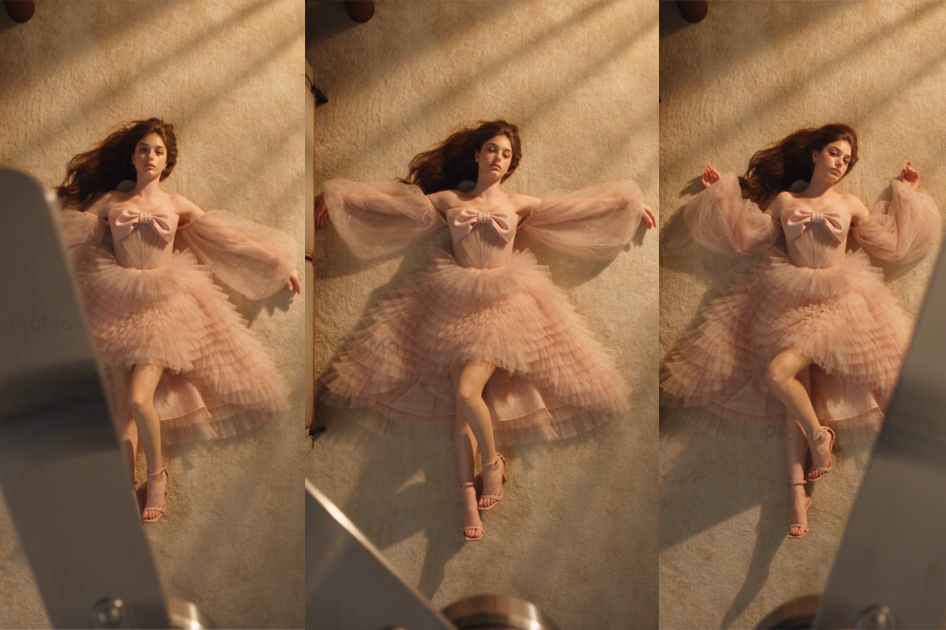

 English