Picma’s AI Replace feature, formerly known as Magic Brush or Partial Redraw, is transforming the way users edit images for both creative and commercial purposes. This powerful tool allows users to effortlessly modify specific areas of an image by brushing over a selected zone and entering a text prompt to describe the desired change. The AI then seamlessly replaces the original content with the new elements, blending them naturally into the image. Whether you’re an e-commerce seller looking to swap products on a model or a content creator experimenting with fashion, Picma’s AI Replace feature offers a fast, user-friendly, and highly effective solution.

How AI Replace Works
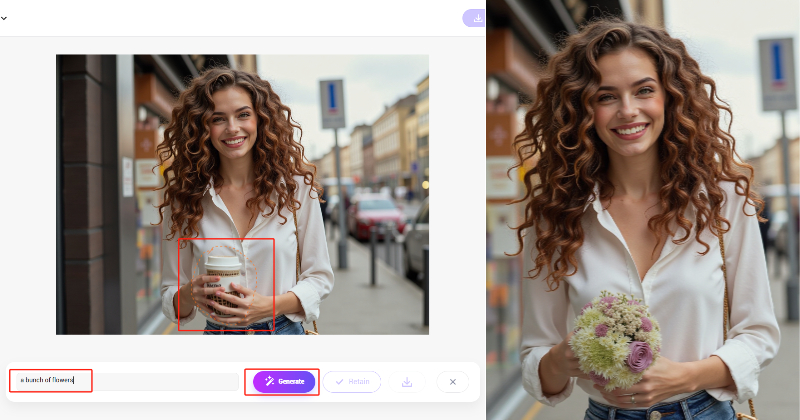
The workflow of Picma’s AI Replace feature is intuitive and accessible, requiring no advanced editing skills. Here’s how it works:
- Upload Your Image: Start by uploading the photo you want to edit to the Picma’s AI Replace feature page or Magic Brush feature in PicMa app.
- Brush the Area: Use the brush tool to highlight the specific zone you want to modify. This could be a product, a garment, or any other element in the image.
- Enter a Text Prompt: Describe the replacement content in the prompt box. For example, you might input “red evening dress” or “sleek black handbag” to replace the original item.
- Generate the Result: Click “Generate,” and Picma’s advanced AI will replace the selected area with the new content, ensuring natural fabric draping, lighting, and alignment with the surrounding image.
- Download your photo: Download your photo when you're satisfied with the result, you can also use other powerful tools to make next move, like enhance, change background, or poster making.
This streamlined process makes it easy for users to achieve professional-quality edits in seconds, without the need for expensive software or design expertise.
E-Commerce: Effortless Product Replacement
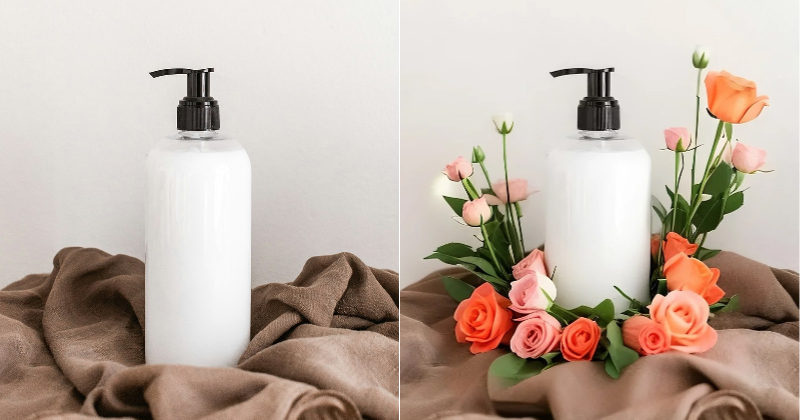
For e-commerce businesses, Picma’s AI Replace feature is a game-changer. It allows sellers to quickly swap products on models or in lifestyle scenes, eliminating the need for costly and time-consuming photoshoots. For example, an online retailer can upload a single model photo and use AI Replace to showcase multiple products—such as swapping a handbag, shoes, or jewelry—while maintaining a consistent look. This not only saves time and resources but also enhances product listings with visually appealing, professional images that attract customers.
The feature’s precision ensures that replacements blend seamlessly, with accurate textures, lighting, and shadows. Whether you’re selling on Amazon, eBay, or Shopify, Picma’s AI Replace helps create clean, eye-catching visuals that stand out in crowded marketplaces. Additionally, the tool integrates with Picma’s suite of e-commerce-focused features, such as background removal and PNG enhancement, to further streamline product photography workflows.
Fashion and Creative Edits: Redefining Style
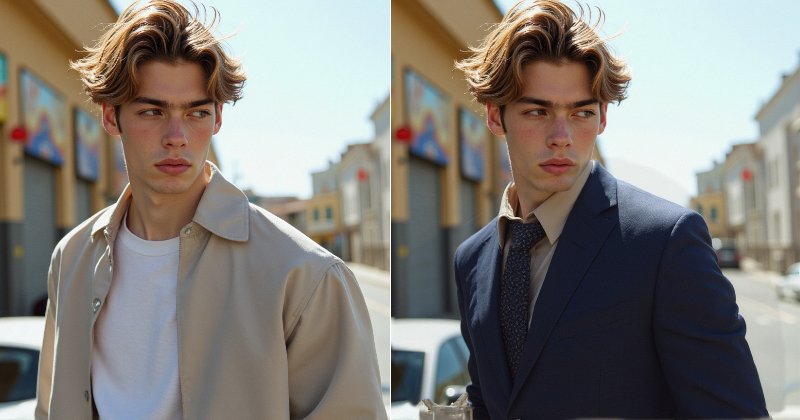
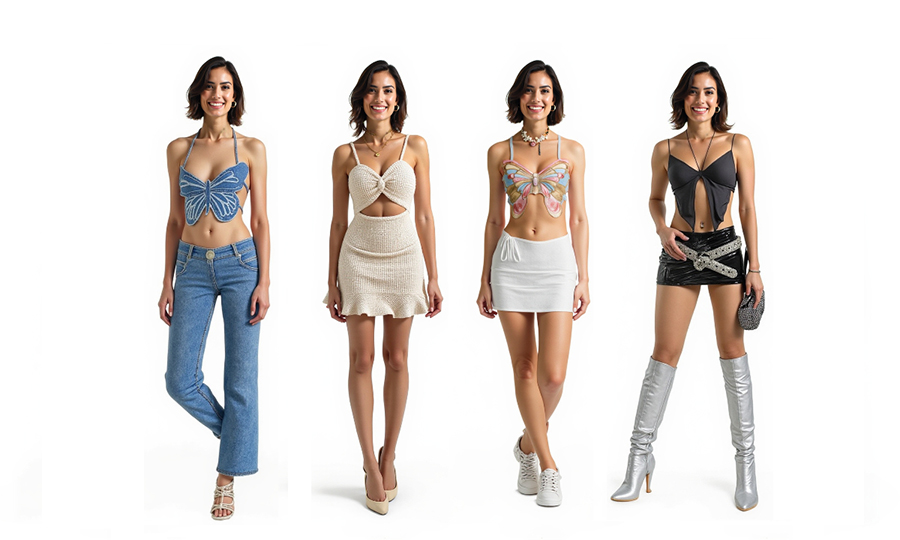
Beyond e-commerce, Picma’s AI Replace feature is a favorite among content creators and fashion enthusiasts. Users can experiment with virtual outfit changes, making it easy to try on different suits, dresses, or accessories without physically changing garments. For instance, you can transform a casual outfit into a glamorous evening gown or swap a plain t-shirt for a trendy patterned jacket—all with a few clicks and a descriptive prompt.
This feature is particularly popular for creating engaging social media content. By brushing over a garment and inputting prompts like “Y2K-inspired crop top” or “classic business suit,” users can generate stunning, realistic visuals that align with the latest fashion trends. The AI ensures that the new garments match the model’s pose and lighting, resulting in natural-looking edits that are perfect for Instagram, TikTok, or personal style experimentation.
Why Picma’s AI Replace Stands Out
Picma’s AI Replace feature is distinguished by its advanced AI algorithms, which deliver precise and realistic results even for complex objects like clothing or accessories. Unlike traditional editing tools, Picma requires no technical expertise, making it accessible to everyone from small business owners to casual users. The ability to refine edits with the “Adjust” tool ensures that even tricky details, such as intricate patterns or fabric folds, are handled with care.
Additionally, Picma’s AI Replace is available for free through the Picma app, allowing users to explore its capabilities without upfront costs. Simply download the app, navigate to the AI Lab, and select the AI Replace feature to get started. The tool’s cross-platform availability and user-friendly interface make it a must-have for anyone looking to elevate their visual content.
Tips for Best Results
To maximize the potential of Picma’s AI Replace feature, keep these tips in mind:
- Use Clear Photos: Full-body shots or high-resolution images work best for accurate replacements.
- Match Poses: Ensure the garment or product photo aligns with the model’s pose angle for seamless integration.
- Be Specific with Prompts: Instead of vague prompts like “dress,” use detailed descriptions like “woman wearing a red floral maxi dress” for better results.
- Experiment with Adjustments: Use the “Adjust” tool to refine edges or textures if the initial result needs tweaking.
Join the Viral AI Replace Trend
Picma’s AI Replace feature is redefining image editing for e-commerce and creative projects. By allowing users to brush over an area and input a prompt, it delivers fast, realistic, and professional-quality replacements that save time and enhance visuals. Whether you’re an online seller showcasing new products or a fashion enthusiast experimenting with virtual outfits, Picma’s AI Replace empowers you to unleash your creativity without barriers. Download Picma today and discover the magic of AI-driven image editing!
Frequently Asked Questions About the AI Replace Feature
1. What is the AI Replace feature?
AI Replace, which is also known as magic brush or partial redraw, is a tool that allows users to brush over a specific area of an image and enter a text prompt to replace it with new content, such as objects or clothing, seamlessly blending with the original image.
2. How can AI Replace benefit e-commerce businesses?
AI Replace enables e-commerce sellers to swap products on models or in scenes without new photoshoots, saving time and costs while creating consistent, professional product visuals for online platforms.
3. Can I use AI Replace to change outfits in photos?
Yes, PicMa's AI Replace is ideal for fashion edits. Brush over a garment, enter a prompt like “blue suit,” and the AI will replace it with a realistic, pose-matched outfit for social media or styling purposes.
4. Do I need editing skills to use AI Replace?
No, PicMa's AI Replace is designed to be user-friendly, requiring no technical expertise. Brush the area, input a prompt, and the AI generates the replacement, with options to refine details if needed.
5. What types of images work best with AI Replace?
High-resolution images or full-body shots yield the best results. For optimal replacements, ensure the pose and lighting of the new content align with the original image for a natural look.
Related Readings:

 440
440

 English