Kling has made video creation faster and easier than ever. With just a single prompt, it can generate dynamic, stylized video clips in minutes—lowering the barrier for creators, designers, and marketers to bring ideas to life through motion.
But as many Kling users have discovered, there's often a gap between impressive concepts and production-ready quality.
You might find the output creative and visually engaging, but still not quite polished enough for posting on social platforms or using in professional content. Blurry textures, unstable facial expressions, and jittery motion are common issues that can limit how far an AI-generated video can go.
⬆️ The results after enhancing videos with PicMa Video Enhancer
Fortunately, you don’t need to start over. You just need one more step: enhancement.
PicMa’s Video Enhancer tool is designed to do exactly that—and here are three ways it can help your Kling videos level up from concept to publishable content.
1.Sharpen visual details and boost clarity
While Kling offers strong scene composition and camera logic, the exported videos often lack sharpness. Lower resolution and missing texture detail can cause videos to look soft or blurry, especially when enlarged or edited further.
PicMa uses intelligent super-resolution to restore lost detail and enhance visual clarity—without altering the original style. It sharpens edges, rebuilds textures, and adds depth to shadows and lighting, producing results that look closer to professionally shot footage.
If you're posting on platforms like YouTube, or TikTok—where HD quality is the norm—this step alone can dramatically improve viewer experience.
2.Fix unstable facial expressions and reduce AI “glitches”
Among the most noticeable issues in AI-generated videos are facial inconsistencies. It’s not uncommon to see faces flicker, warp, or break apart as characters move, blink, or talk.
PicMa’s facial enhancement feature automatically detects and stabilizes these regions frame by frame. It restores consistent structure to eyes, mouth, and facial contours—making characters feel more human and emotionally coherent.
Whether you’re working on narrative shorts, virtual influencer content, or animated storytelling, this can significantly boost the realism and credibility of your characters.
3.Improve motion flow and reduce jitter
Another frequent issue with Kling output is inconsistent frame pacing. Motions can feel robotic or glitchy, especially during fast transitions or camera shifts. This limits your ability to reuse clips in professional edits or rhythm-based cuts.
PicMa addresses this by using AI-based frame interpolation to smooth out transitions and stabilize motion. The result is a video that feels more natural, polished, and
watchable—ideal for final publishing or integration into larger edits.
How to use PicMa to enhance Kling videos
Using PicMa is fast, simple, and doesn't require any editing experience:
1. Generate and download your video from Kling (use the highest available resolution)
2. Go to PicMa website and open the Video Enhancer tool
3. Upload your video—PicMa will automatically analyze it and suggest the best enhancement mode
4. Click “Enhance” and let the system process your video in just a few minutes
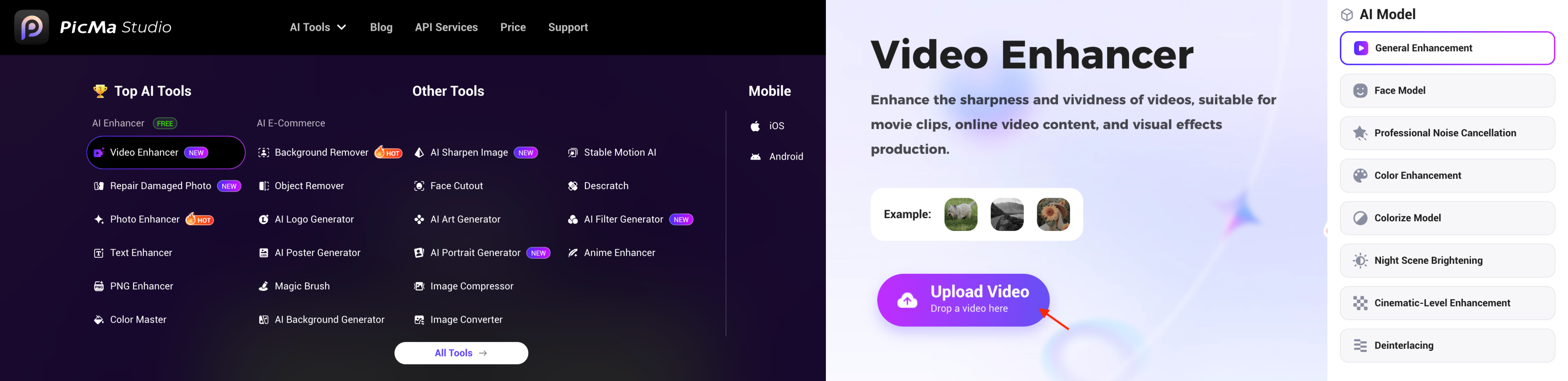
Once it's done, you can download a professionally enhanced version—ready to post, publish, or include in your next project.
Why this final step makes a big difference
You’ve already spent time crafting a prompt, generating a concept, and shaping the visuals with Kling. PicMa doesn’t change your creative vision—it simply makes it more presentable, more stable, and more watchable.
· For social video creators, it adds clarity and smoothness
· For brands or clients, it increases visual credibility
· For indie storytellers, it’s the missing step between concept and completion
Kling turns your ideas into visuals. PicMa helps you turn those visuals into content worth sharing.
Try PicMa Video Enhancer today and bring your Kling creations up to publishing standard.



 193
193

 English