Can AI produce YouTube videos? Yes — but the honest answer is more nuanced than a simple yes or no. If by “produce” you mean generate a complete, polished, highly original video from scratch with no human input, the current answer is usually no. If you mean helping with ai content creation, speeding up repetitive edits, and turning existing visuals into a usable ai youtube video, then yes, AI can absolutely do part of the job.
That difference matters because most people asking this question are not trying to make a film from nothing. They usually want to publish faster, save time on editing, or turn a photo, product shot, or graphic into something that moves. For those use cases, video automation is already practical. The key is knowing where AI helps and where it still needs a human hand.
What people usually mean when they ask if AI can produce YouTube videos
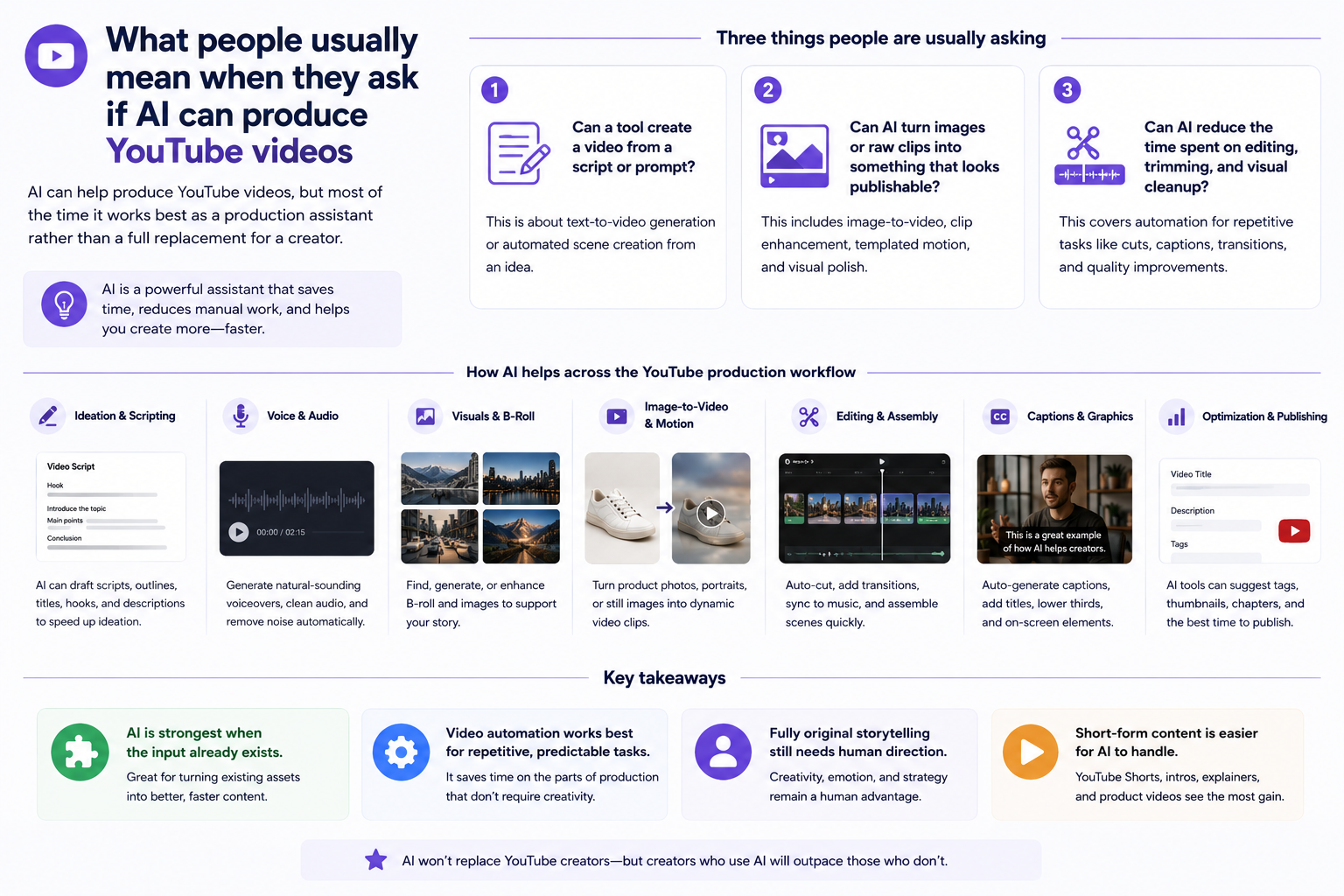
AI can help produce YouTube videos, but most of the time it works best as a production assistant rather than a full replacement for a creator.
When someone asks can ai produce youtube videos, they are usually asking one of three things. First, can a tool create a video from a script or prompt? Second, can AI turn images or raw clips into something that looks publishable? Third, can AI reduce the amount of time spent on editing, trimming, and visual cleanup? Those are very different questions, and they lead to very different expectations.
In practice, the strongest ai content creation tools do not magically replace the whole workflow. They automate parts of it. Some tools help with scripting or voice generation, others handle captioning or scene assembly, and some focus on image-to-video or template-based motion. That last category is especially important for creators who already have visuals and just need a quick way to make them feel alive. If your input is a finished product photo, a portrait, or an old scanned image, AI can often add motion or polish fast enough to make publishing easier.
· AI is strongest when the input already exists.
· Video automation works best for repetitive, predictable tasks.
· Fully original storytelling still needs human direction.
· Short-form content is easier for AI to handle than complex long-form videos.
The realistic ways AI helps with YouTube video production
The most realistic use of AI in YouTube production is accelerating editing, cleanup, and simple motion work — not replacing the creator’s idea.
For many creators, the real bottleneck is not creativity. It is time. Cutting dead space, cleaning up visuals, adding simple motion, and preparing thumbnails or support graphics can take longer than people expect. AI can help by compressing those steps into a faster workflow. That is why ai youtube video tools are becoming common among solo creators, marketers, and small teams.
A realistic workflow might look like this: you start with a photo, product image, or still graphic; you clean it up; you animate it lightly; then you add your own title, narration, and pacing in a video editor. That workflow does not remove the creative decision-making, but it does remove some of the most tedious manual work. For people making simple explainers, product teasers, or social reposts, that can be enough to justify using AI.
· Good use cases: short intros, product teasers, social clips, recap visuals.
· Weak use cases: story-heavy videos, multi-scene explainers, advanced motion design.
· AI is often better at enhancement than invention.
· The creator still has to decide pacing, message, and final structure.
Where AI video automation helps most — and where it falls short
Video automation is useful for speed, consistency, and scale, but it usually cannot match a skilled editor on originality or fine control.
The biggest advantage of video automation is consistency. If you need to publish the same style of content many times, AI can reduce the effort required to keep visuals aligned. That is useful for ecommerce clips, quick promotional videos, and recurring content formats. You can repeat a basic structure without rebuilding it every time.
But there are clear tradeoffs. Automation tends to work from templates or preset behaviors, which means less freedom. A creator who wants exact camera movement, precise timing, or frame-by-frame control will run into limits quickly. In other words, AI is excellent at removing friction, but it is not the same as having a full video studio in a browser. If the concept depends on subtle visual storytelling, manual editing still wins.
· Best for repeatable formats.
· Less useful for highly customized storytelling.
· Template systems save time but reduce freedom.
· Source quality and composition strongly affect the result.
A practical test scenario: turning a still image into a YouTube-ready clip
A short image-based animation is one of the most realistic AI video workflows today, because it starts from something concrete and only asks AI to do a limited job.
Imagine you have a clean product shot of a backpack and want a 10-second YouTube Short. A realistic AI workflow would not be to ask a tool to invent the entire ad from nothing. Instead, you would begin with the image, apply a bit of enhancement if needed, and then animate it with a motion effect or template. After that, you would add text, music, and maybe a voiceover in your editor.
That kind of workflow is effective because the image already defines the subject, and AI only has to create movement and visual interest. The same idea works for portraits, event posters, or restored family photos when the goal is a simple clip rather than a cinematic sequence. However, this is also where limits appear. If the image is blurry, badly cropped, or visually confusing, the animation tends to look less convincing. And because the motion is template-based, you do not get deep control over the exact camera path or frame sequence.
· Start with a strong image instead of a vague idea.
· Keep the first output short and simple.
· Use AI for motion and enhancement, then finish manually.
· Expect better results from clean, high-resolution sources.
Bridge to PicMa AI: the most relevant feature for this workflow
If your goal is to make an image-based ai youtube video faster, the most relevant PicMa AI feature is AI Video, which animates existing images into short clips using templates.
This is where PicMa AI fits naturally into the conversation. PicMa is not just one tool — it is a multi-tool platform for image editing, enhancement, and video creation. For this topic, the key feature is AI Video. It starts from an existing image, lets you choose a motion template or effect, and exports a short animated video clip. That makes it a practical match for creators who want quick visual movement without learning a heavy editing workflow.
The important part is what AI Video is not. It is not a pure text-to-video generator, and it is not meant to replace full frame-level video editing. The value is speed and simplicity: you prepare the image, pick a motion style, and export. If the source image is weak, the result will usually be weak too, so pairing AI Video with tools like Photo Enhancer or Smart Restore can make a real difference. If you want to explore the broader platform, you can start at the <a href='https://picma.magictiger.ai'>PicMa AI homepage</a> or look into the <a href='https://picma.magictiger.ai/support'>support page</a> for feature guidance.
· AI Video works from an existing image, not a text prompt.
· It is useful for short animated clips and simple motion effects.
· It pairs well with enhancement tools when the source image needs cleanup.
· It is better for speed than for full creative control.
Comparison
| Tool | Best for | Speed | Consistency | Main drawback |
| Manual video editing | Complex storytelling and full creative control | Slow | High if skilled | Takes time and experience |
| AI video automation tools | Repeating simple video tasks quickly | Fast | Medium | Limited customization |
| PicMa AI AI Video | Animating existing images into short clips | Fast | Medium-High for simple outputs | Template-based and not frame-editable |
| PicMa AI Photo Enhancer | Improving source images before animation | Fast | High | Does not create motion by itself |
FAQ
· Q: Can AI produce YouTube videos from scratch?
A: Sometimes, but usually only in a limited sense. AI can help create parts of a video or assemble simple formats, but full from-scratch production still benefits from human planning, editing, and review.
· Q: Is AI good for YouTube Shorts?
A: Yes, especially for short, repeatable formats. AI works well when you start with an existing image, clip, or graphic and only need quick motion or cleanup.
· Q: What is the biggest limitation of AI video automation?
A: The biggest limitation is control. AI can be fast, but template-based workflows usually do not offer precise frame-level editing or highly customized scene building.
· Q: Does PicMa AI create videos from text prompts?
A: No. PicMa AI’s AI Video feature starts from an existing image and uses motion templates or effects to create a short animated clip.
· Q: Who should not rely on AI for YouTube video production?
A: Creators making documentaries, complex narrative videos, or projects that need exact visual timing should not rely on AI alone. Those formats usually need more manual control than AI tools provide.
Conclusion
So, can ai produce youtube videos? Yes — if you define production as helping create, speed up, and automate parts of the process. AI is already useful for ai content creation, especially when the workflow begins with an existing image or other visual asset.
For creators who want fast, practical results, AI video automation can be a real advantage. Just keep the limitations in mind: it is not a replacement for judgment, storytelling, or careful editing. If your next step is turning a photo into a short clip, PicMa AI’s AI Video feature is a sensible place to look — especially when paired with its image enhancement tools.


 English